Readline Editor Variables
To open an external editor, Readline needs to know which editor to launch. To do this, it checks two environment variables: VISUAL and EDITOR. First Readline checks the variable VISUAL; if that variable is unset or does not name a valid editor, Readline then checks the EDITOR variable. If neither variable contains the name of a usable editor, the edit request fails and the command line is left unchanged.
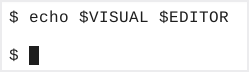
Before using Readline’s external‑editor feature, we should check the current values of the VISUAL and EDITOR variables. To do this we will execute the command echo $VISUAL $EDITOR.
In our illustration you can see neither of the variables are set.
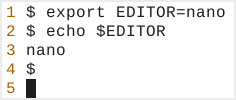
The command, export EDITOR=nano sets the value of the variable EDITOR to nano. We can test the results by executing the command echo $EDITOR.
The following table illustrates how to set the VISUAL and EDITOR variables for multiple editors.
| Editor | Export Command* | Shell Out Sequence | ||
|---|---|---|---|---|
| vim | export VISUAL=vim export EDITOR=vim | ESC: r! <command> | ||
| nano | export VISUAL=nano export EDITOR=nano | C-r, C-x <command> | ||
| gedit* | export VISUAL=gedit export EDITOR=gedit | Not Available | ||
| gnome-text-editor* | export VISUAL=gnome-text-editor export EDITOR=gnome-text-editor | Not Available | ||
| gnome-editor* | export VISUAL=gnome-editor export EDITOR=gnome-editor | Not Available |